
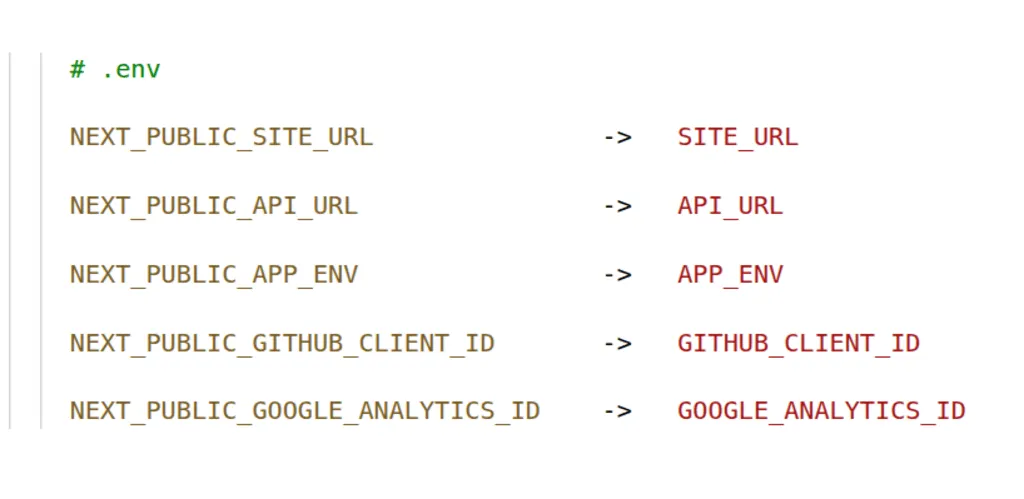
Runtime environment variables in Next.js - build reusable Docker images
Learn how to configure Next.js with runtime environment variables and build Docker images you can reuse across multiple environments.
· tips-and-tricks · 14 minutes
Classification of environment variables by dimension
At first glance, you might think of environment variables as just a few values needed when the app starts, but as you dig deeper, you realize it’s far more complex than that. If you don’t clearly understand the nature of the value you’re dealing with, you’ll have a hard time running the app and managing its configuration across multiple environments.
Let’s identify a few dimensions that any environment variable can have:
- When: build-time, start-time, run-time
- Where: server (static, SSR (request), ISR), client
- Visibility: public, private
- Requirement: optional, required
- Scope: common for all environments (constant, config), unique
- Mutability: constant, mutable
- Git tracking: versioned, ignored
There are probably more, but this is enough to understand why it can be challenging to manage. We could go very wide, write a long article and elaborate each of these and their combinations, but since the goal of this article is very specific and practical - handling Next.js environment variables in Docker, we’ll focus just on the top three items from the list. Still, it was worth mentioning the others for context.
Next.js environment variables
If you search the Next.js docs, you will find a guide on environment variables, such as .env* filenames that are loaded by default, their load order and priority, variable expansion, and exposing and inlining variables with the NEXT_PUBLIC_ prefix into the client. In the self-hosting guide, you will also find a paragraph about opting into dynamic rendering so that variable values are read on each server component render, not just once at build time, and how this is useful for reusable Docker images.
The problem with build-time environment variables
A common scenario after reading the docs is to be aware of NEXT_PUBLIC_ and server variables and then scatter them around the codebase. If you use Docker and GitHub Actions, you will typically end up with something like this:
# Next.js app installer stageFROM base AS installerRUN apk updateRUN apk add --no-cache libc6-compat
# Enable pnpmENV PNPM_HOME="/pnpm"ENV PATH="$PNPM_HOME:$PATH"RUN corepack enableRUN corepack prepare pnpm@10.12.4 --activate
WORKDIR /app
# Copy monorepo package.json and lock filesCOPY --from=builder /app/out/json/ .# Install the dependenciesRUN pnpm install --frozen-lockfile
# Copy pruned sourceCOPY --from=builder /app/out/full/ .
# THIS: set build time env varsARG ARG_NEXT_PUBLIC_SITE_URLENV NEXT_PUBLIC_SITE_URL=$ARG_NEXT_PUBLIC_SITE_URLRUN echo "NEXT_PUBLIC_SITE_URL=$NEXT_PUBLIC_SITE_URL"
ARG ARG_NEXT_PUBLIC_API_URLENV NEXT_PUBLIC_API_URL=$ARG_NEXT_PUBLIC_API_URLRUN echo "NEXT_PUBLIC_API_URL=$NEXT_PUBLIC_API_URL"
# Build the projectRUN pnpm turbo build
# ...
11c8a512…/.github/workflows/build-push-frontend.yml
name: Build and push Docker frontend
on:  push:    branches:      - 'main'  workflow_dispatch:
env:  IMAGE_NAME: ${{ github.event.repository.name }}-frontend  # THIS: set build time env vars  NEXT_PUBLIC_SITE_URL: 'https://full-stack-fastapi-template-nextjs.arm1.nemanjamitic.com'  NEXT_PUBLIC_API_URL: 'https://api.full-stack-fastapi-template-nextjs.arm1.nemanjamitic.com'
jobs:  build:    name: Build and push docker image    runs-on: ubuntu-latest    steps:
    # ...
      - name: Build and push Docker image        uses: docker/build-push-action@v6        with:          context: ./frontend          file: ./frontend/Dockerfile          platforms: linux/amd64,linux/arm64          progress: plain          # THIS: set build time args          build-args: |            "ARG_NEXT_PUBLIC_SITE_URL=${{ env.NEXT_PUBLIC_SITE_URL }}"            "ARG_NEXT_PUBLIC_API_URL=${{ env.NEXT_PUBLIC_API_URL }}"          push: true          tags: ${{ secrets.DOCKER_USERNAME }}/${{ env.IMAGE_NAME }}:latest
11c8a512…/frontend/package.json
{  "name": "full-stack-fastapi-template-nextjs",  "version": "0.0.1",  "private": true,  "scripts": {    "build": "turbo build",    "dev": "turbo dev",    "standalone": "turbo run standalone --filter web",    // THIS: set build time args    "docker:build:x86": "docker buildx build -f ./Dockerfile -t nemanjamitic/full-stack-fastapi-template-nextjs-frontend --build-arg ARG_NEXT_PUBLIC_SITE_URL='full-stack-fastapi-template-nextjs.local.nemanjamitic.com' --build-arg ARG_NEXT_PUBLIC_API_URL='api.full-stack-fastapi-template-nextjs.local.nemanjamitic.com' --platform linux/amd64 ."
  // ...
  },
  // ...
}
In the code above, we can see that our Next.js app requires the NEXT_PUBLIC_SITE_URL and NEXT_PUBLIC_API_URL environment variables at build time. These values will be inlined into the bundle during the build and cannot be changed later. This means the Dockerfile must pass them as the corresponding ARG_NEXT_PUBLIC_SITE_URL and ARG_NEXT_PUBLIC_API_URL build arguments when building the image.
Leaving them undefined would break the build because they are validated with Zod inside the Next.js app, and validation runs at both build time and run time. Stripping the NEXT_PUBLIC_ prefix would also break the build, even without Zod, if they are used in client code.
Consequently, we need to pass these build arguments whenever we build the Docker image, for example in GitHub Actions and in the local build script defined in package.json.
Using this method, we would get a functional Docker image, but with one major drawback: it can be used only in a single environment because the NEXT_PUBLIC_SITE_URL and NEXT_PUBLIC_API_URL values are baked into the image at build time and are immutable.
To make this crystal clear, whatever we set for the NEXT_PUBLIC_SITE_URL and NEXT_PUBLIC_API_URL environment variables at runtime will be ignored because they no longer exist in the Next.js app. After the build they are replaced with string literals in the JavaScript bundle.
If, besides production, you also have staging, preview, testing environments, or other production mirrors, you would need to maintain a separate image with its own configuration code, build process, and registry storage for each of them. This means a lot of overhead.
Many people find this impractical, which you can see from the popularity of such issues in the Next.js repository:
Better support for runtime environment variables #44628
Docker image with NEXT_PUBLIC_ env variables #17641
Not possible to use different configurations in staging + production #22243
The solution: run-time environment variables
The solution is obvious: we should prevent any use of build-time (stale, immutable) variables and read everything from the target environment at runtime. This also means avoiding any NEXT_PUBLIC_* client variables.
To implement this, we must be well aware of where and when a given component runs:
- Server component - runs on the server, generated at build time or at request time
- Static page - runs on the server, generated once at build time
- Client component - runs in the browser, generated at build time or at request time
Server component
These components (or entire pages) are dynamically rendered on each request. They have access to any server data, including both public and private environment variables. No additional action is needed. In Next.js, we identify such components by their use of request resources such as cookies, headers, and connection:
import { cookies, headers } from 'next/headers';import { connection } from 'next/server';
export default async function Page() {  const headersList = await headers();  const cookiesList = await cookies();
  await connection(); // void}
Static page
Such a page is pre-rendered once at build time in the build environment. It has access to server data, but it is converted to a static asset at build time and is immutable at runtime. We have two options:
- Convert it to a dynamic page that is rendered on the server on each request.
import { connection } from 'next/server';
export default async function Page() {
  // opt into dynamic rendering  await connection();
// ...}-
Set placeholder values for variables at build time and perform string replacement directly on the generated static HTML using
sedorenvsubstand a shell script included inENTRYPOINT ["scripts/entrypoint.sh"]in the Dockerfile.Note that these will be start-time variables, not true run-time variables, but most of the time that is sufficient because they are unique to each environment. However, they cannot change during the app’s run time once initialized.
We won’t go into much detail about this method, it could be a good topic for a future article since it is quite useful for static, presentational websites. If you want to read more, here is an interesting and practical tutorial: https://phase.dev/blog/nextjs-public-runtime-variables/.
Client component
Next.js prevents exposing any variables to the client without the NEXT_PUBLIC_ prefix, but since those are inlined at build time, we simply won’t use them. For exposing environment variables to client components, we have a few options:
-
Pass variables as props from the parent server component like any other value. This is simple and convenient.
-
Inside the dynamically generated root layout, render a
<script />tag that injects awindow.__RUNTIME_ENV__property into the globalwindowobject using thedangerouslySetInnerHTMLattribute. We will actually use this method. Then, on the client, we can access the variables on thewindowobject, for examplewindow.__RUNTIME_ENV__.API_URL.Also this is a good moment to validate runtime vars with Zod.
Here is the illustration code bellow:
import { connection } from 'next/server';
export const runtimeEnvSchema = z.object({  SITE_URL: z.url().regex(/[^/]$/, 'SITE_URL should not end with a slash "/"'),  API_URL: z.url().regex(/[^/]$/, 'API_URL should not end with a slash "/"'),});
const RootLayout: FC<Props> = async ({ children }) => {  await connection();
  const runtimeEnvData = {    SITE_URL: process.env.SITE_URL,    API_URL: process.env.API_URL,  };
  // validate vars with Zod before injecting  const parsedRuntimeEnv = runtimeEnvSchema.safeParse(runtimeEnvData);
  // if invalid vars abort  if (!parsedRuntimeEnv.success) throw new Error('Invalid runtime environment variable found...');
  const runtimeEnv = parsedRuntimeEnv.data;
  return (    <html lang="en">      <body>        {/* Inline JSON injection */}        <script          dangerouslySetInnerHTML={{            __html: `window.__RUNTIME_ENV__ = ${JSON.stringify(runtimeEnv)};`,          }}        />
{children} </body> </html> );}- Same as for static pages: set placeholder values and use
sedto replace them with a shell script inside the JavaScript bundle when the container starts. - Expose variables through a dynamic API endpoint and perform an HTTP fetch in client components. This is a legitimate method, but note that it will make the variables asynchronous.
We can see from this that the first two methods are the simplest and most convenient, so we will use them.
Note: Whenever an environment variable is available on the client, it is public by default. Make sure not to expose any secrets to the client.
alizeait/next-public-env package
We could do this manually as shown in the snippet above, but there is already the alizeait/next-public-env package that handles all of this and also provides some more advanced handling.
Check these 2 files for example:
Usage is obvious and straightforward: just define a Zod schema, mount <PublicEnv /> in the root layout, and use getPublicEnv() to access the variables wherever you need them.
You can see bellow how I did it:
# install package
pnpm add next-public-env
frontend/apps/web/src/config/process-env.ts
/** Exports RUNTIME env. Must NOT call getPublicEnv() in global scope. */export const { getPublicEnv, PublicEnv } = createPublicEnv( { NODE_ENV: process.env.NODE_ENV, SITE_URL: process.env.SITE_URL, API_URL: process.env.API_URL, }, { schema: (z) => getProcessEnvSchemaProps(z) });frontend/apps/web/src/schemas/config.ts
import { z } from 'zod';
export const nodeEnvValues = ['development', 'test', 'production'] as const;
type ZodType = typeof z;
/** For runtime env. */export const getProcessEnvSchemaProps = (z: ZodType) => ({  NODE_ENV: z.enum(nodeEnvValues),  SITE_URL: z.url().regex(/[^/]$/, 'SITE_URL should not end with a slash "/"'),  API_URL: z.url().regex(/[^/]$/, 'API_URL should not end with a slash "/"'),});
/** For schema type. */export const processEnvSchema = z.object(getProcessEnvSchemaProps(z));
frontend/apps/web/src/app/layout.tsx
import { PublicEnv } from '@/config/process-env';
interface Props {  children: ReactNode;}
const RootLayout: FC<Props> = ({ children }) => (  <html lang="en" suppressHydrationWarning>    <body className={fontInter.className}>      <PublicEnv />      <ThemeProvider attribute="class" defaultTheme="light" enableSystem disableTransitionOnChange>        {/* Slot with server components */}        {children}        <Toaster />      </ThemeProvider>    </body>  </html>);
export default RootLayout;
An example usage, for instance in instrumentation.ts, to log the runtime values of all environment variables for debugging purposes:
frontend/apps/web/src/instrumentation.ts
/** Runs only once on server start. */
/** Log loaded env vars. */export const register = async () => {  if (process.env.NEXT_RUNTIME === 'nodejs') {    const { prettyPrintObject } = await import('@/utils/log');    const { getPublicEnv } = await import('@/config/process-env');
    prettyPrintObject(getPublicEnv(), 'Runtime process.env');  }};
Usage for baseUrl for OpenAPI client
This is another typical and very important spot for using the API_URL environment variable. What makes it tricky is that it is included and runs on both the server and in the browser, but it is defined in a single place.
However, alizeait/next-public-env resolves this complexity very well on its own, and you can simply use getPublicEnv() to get the API_URL value while letting the package handle the rest.
frontend/apps/web/src/lib/hey-api.ts
import { getPublicEnv } from '@/config/process-env';
/** Runtime config. Runs and imported both on server and in browser. */export const createClientConfig: CreateClientConfig = (config) => {  const { API_URL } = getPublicEnv();
  return {    ...config,    baseUrl: API_URL,    credentials: 'include',    ...(isServer() ? { fetch: serverFetch } : {}),  };};
Legitimate build-time environment variables
Variables that are the same for every environment can be left as NEXT_PUBLIC_ and inlined into the bundle. They should also be versioned in Git (their .env.* files). Since this is the case, the best approach is to store them as TypeScript constants directly in the source, because that is what they truly are - shared constants.
Build and deploy reusable Docker image
Build once - deploy everywhere. Use a single image and .env file with no redundancy.
Building
Now that we have eliminated all build-time variables by converting them to run-time environment variables, we can simply remove all build arguments and environment variables from the Dockerfile, Github Actions build workflow, package.json build scripts, etc.
Note: During the build phase of a Next.js app, the global scope is also executed. Therefore, if you read any environment variables, such as process.env.MY_VAR_XXX, your code must be able to handle a default undefined value without throwing exceptions, as this would break the build.
Tip: To access environment variables, always use getPublicEnv() inside components and functions. Never call getPublicEnv() or read process.env in the global scope, this way, you won’t need to handle undefined environment variables explicitly for the build to pass.
Simply remove all build arguments and build-time environment variables from the Dockerfile:
# Not needed anymore, remove all build argsARG ARG_NEXT_PUBLIC_SITE_URLENV NEXT_PUBLIC_SITE_URL=$ARG_NEXT_PUBLIC_SITE_URLRUN echo "NEXT_PUBLIC_SITE_URL=$NEXT_PUBLIC_SITE_URL"
ARG ARG_NEXT_PUBLIC_API_URLENV NEXT_PUBLIC_API_URL=$ARG_NEXT_PUBLIC_API_URLRUN echo "NEXT_PUBLIC_API_URL=$NEXT_PUBLIC_API_URL"
This is the cleaned up Dockerfile that I am using to build Next.js app inside the monorepo: frontend/Dockerfile.
Also, don’t forget to clean up unused build arguments from the Github Actions workflow and package.json scripts for building the Docker image. You can see mine here: .github/workflows/build-push-frontend.yml, frontend/package.json.
"scripts": { "docker:build:x86": "docker buildx build -f ./Dockerfile -t nemanjamitic/full-stack-fastapi-template-nextjs-frontend --platform linux/amd64 ."},Deployment
Once built, you can use that image to deploy to any environment. Naturally, you need to define and pass all runtime environment variables into the Docker container. In your docker-compose.yml, use the env_file: or environment: keys.
services:  frontend:    image: nemanjamitic/full-stack-fastapi-template-nextjs-frontend:latest    container_name: full-stack-fastapi-template-nextjs-frontend    restart: unless-stopped    env_file:      - .env    environment:      - PORT=3000
# ...SITE_URL=https://full-stack-fastapi-template-nextjs.arm1.nemanjamitic.comAPI_URL=https://api-full-stack-fastapi-template-nextjs.arm1.nemanjamitic.comNODE_ENV=production
# ...You can see docker-compose.yml and .env I am using here: apps/full-stack-fastapi-template-nextjs/docker-compose.yml, apps/full-stack-fastapi-template-nextjs/.env.example
Alternative approaches
In the Static page section, I already mentioned a few notes about runtime variables and static websites. Indeed, you have two options for runtime variables:
-
Convert the website from static to dynamically rendered SSR (rendered at request time). Note that this is a significant change: from this point, your website will require a Node.js runtime, which will greatly impact your deployment options, as you can no longer use static hosting.
This is overkill just for the purpose of having runtime environment variables. Use it only if your website has additional reasons to use SSR.
-
Perform string replacement directly on bundle assets using
sed,envsubst, etc. This is the right approach. There are other options, such as the Nginxsubs_filterconfig option, but be careful with it, as it runs on each request and can waste CPU.
Another option to consider is using an ./env.js file instead of the usual .env. You can then host it with Nginx and load it into the app using <script src="./env.js" />. After that, you can reference the variables with window.__RUNTIME_ENV__.MY_VAR.
Note that this won’t work well for usage in pure HTML pages. For example, Astro omits any client-side JavaScript by default, so you would need to use an additional inline <script /> tag to update the HTML, e.g., getElementById("my-id")?.textContent = window.__RUNTIME_ENV__.MY_VAR, which is less optimal than the string replacement method.
Here is a quick, approximate code for illustration:
// define variables
window.__RUNTIME_ENV__ = { SITE_URL: "https://my-static-website.com", PLAUSIBLE_DOMAIN: 'my-static-website.com', PLAUSIBLE_SCRIPT_URL: 'https://plausible.my-server.com/js/script.js',};# mount and host env.js file
my-static-website: image: nginx:1.29.1-alpine3.22-slim container_name: my-static-website restart: unless-stopped volumes: - ./website:/usr/share/nginx/html - ./env.js:/usr/share/nginx/html/env.js # this - ./nginx/nginx.conf:/etc/nginx/nginx.conf
# ...<!-- Load env.js file -->
<head> <meta charset="UTF-8" /> <title>My static website</title>
<script src="./env.js"></script>
<!-- ... --></head><!-- example usage -->
<!-- example 1: assign var to text content --><span id="my-element"></span>
<script> const mySpan = document.getElementById('my-element'); mySpan.textContent = window.__RUNTIME_ENV__.MY_VAR;</script>
<!-- example 2: assign var to script attribute --><script> const script = document.createElement("script"); script.defer = true; script.type = "text/partytown";
// dynamically set attributes from runtime env script.dataset.domain = window.__RUNTIME_ENV__.PLAUSIBLE_DOMAIN; script.src = window.__RUNTIME_ENV__.PLAUSIBLE_SCRIPT_URL;
document.head.appendChild(script);</script>So, to conclude, the best approach is to use a shell script with sed or envsubst and add it to the Nginx Dockerfile ENTRYPOINT or the docker-compose.yml command:. Here is the link to the already mentioned practical tutorial again: https://phase.dev/blog/nextjs-public-runtime-variables/.
Completed code
- Next.js app repository: https://github.com/nemanjam/full-stack-fastapi-template-nextjs/tree/main/frontend/apps/web
- Deployment repository: https://github.com/nemanjam/traefik-proxy/tree/main/apps/full-stack-fastapi-template-nextjs
The relevant files:
# 1. Next.js app repo
# https://github.com/nemanjam/full-stack-fastapi-template-nextjs/tree/e990a3e29b7af60831851ff6f909c34df6a7f800
git checkout e990a3e29b7af60831851ff6f909c34df6a7f800
# run-time vars configurationfrontend/apps/web/src/config/process-env.tsfrontend/apps/web/src/schemas/config.tsfrontend/apps/web/src/app/layout.tsx
# usagesfrontend/apps/web/src/instrumentation.tsfrontend/apps/web/src/lib/hey-api.ts
# 2. Deployment repo
# https://github.com/nemanjam/traefik-prox/tree/f3c087184e851db20e65409a6dd145767dd9bc2b
git checkout f3c087184e851db20e65409a6dd145767dd9bc2b
apps/full-stack-fastapi-template-nextjs/docker-compose.ymlapps/full-stack-fastapi-template-nextjs/.env.example
Conclusion
If you go by inertia and mix and scatter run-time and build-time variables around the source code, build, and deployment configuration, you will end up with development and production environments that are difficult to manage, hard to debug and replicate bugs, have an unreliable deployment process, constantly require troubleshooting for missing or invalid environment variables, and result in redundant Docker images, among other issues.
So, take a proactive approach: understand properly and identify the variables you are dealing with. One way to do this is to leverage the power and convenience of run-time environment variables.
What approach do you use to manage environment variables in Next.js apps? Feel free to share your experiences and opinions in the comments.
References
- How to use environment variables in Next.js, Next.js docs guide https://nextjs.org/docs/app/guides/environment-variables#runtime-environment-variables
- How to self-host your Next.js application, Next.js docs guide https://nextjs.org/docs/app/guides/self-hosting#environment-variables
- Better support for runtime environment variables #44628, Github discussion https://github.com/vercel/next.js/discussions/44628
- Docker image with NEXT_PUBLIC_ env variables #17641, Github discussion https://github.com/vercel/next.js/discussions/17641
- Not possible to use different configurations in staging + production #22243, Github discussion https://github.com/vercel/next.js/discussions/22243
- Runtime variables for static website, tutorial https://phase.dev/blog/nextjs-public-runtime-variables/
- Runtime Environment Variables in Next.js, concise overview https://dt.in.th/NextRuntimeEnv
More posts
-
Expose local dev server with SSH tunnel and Docker
A practical example how to temporarily expose your local service to the internet.
-
Why runtime environment variables for a pure static website are a bad idea
Build and deploy a static website as a reusable Docker image, and see how practical it really is.
-

Deploying a FastAPI and Next.js website to Vercel
A straightforward guide on how to deploy a full-stack FastAPI and Next.js app to Vercel, including a ready-to-use code example.